Earthquake
- 4.7
- Rating
- 1.00M
- Installs
- Free
- Price

 Analysis by App-foxy
I like weather tools that stay focused on one useful job, and Earthquake takes that approach seriously. Instead of trying to replace a full forecast app, it concentrates on seismic activity: recent worldwide earthquake information, alerts, and a map for putting events into geographic context. That narrow purpose makes it easier to understand what the app is for, but it also means you should not install it expecting rainfall forecasts, temperature charts, storm tracking, or emergency planning guidance.
In my experience, the main appeal is awareness rather than prediction. An earthquake app cannot tell you when the next earthquake will happen, and this one should be treated as an information and notification tool, not as a promise of advance warning. Used with sensible expectations, it can be a practical way to check whether a tremor reported by friends or news outlets appears in worldwide seismic activity and to follow events that matter to a particular region.
What Earthquake actually does well
Earthquake is a free weather-category app developed by Nico Tranquilli. It is suitable for Everyone, works on Android from version 8.1 onward, and has reached more than a million installs. Its current version is 2.4.1, and the app was released on June 5, 2025. Those details matter because the application is relatively focused: you are getting a dedicated seismic monitor rather than a large, all-purpose weather suite.
You May Also Like

 Blood Strike: 2.5 Anniversary
Blood Strike’s Loadouts Turn Every Drop Into a Tactical Gamble
A close look at Blood Strike’s custom loadouts: how fast access to signature weapons reshapes its battle royale rhythm, rewards preparation, and narrows the gap between fights.

 Pandora - Music & Podcasts
Pandora’s Music Is Easy to Start, but Harder to Recover
Pandora’s strength is its low-effort path from a seed to a station. Its weak spot is how much confidence it asks you to place in connection, setup, and quiet recovery.

 8 Ball Pool
 Is Built on Rivalries, Rematches, and Routine
A close look at the rivalries, rematches, shared routines, and unanswered safety questions that turn a quick pool match into a persistent mobile community.

 Samsung Music
’s Quiet Strength Is Playing What You Already Own
Its reach comes less from spectacle than from dependable access to a personal library. That simplicity is both the app’s strongest retention engine and its ceiling.

 AccuWeather: Weather Radar
AccuWeather Review: A Quick, Clear Forecast for Everyday Decisions
For everyday plans, the best forecast is the one you can understand quickly. AccuWeather makes rain timing, radar, and local conditions easy to act on, with a few trade-offs.

 Hill Climb Racing
Why Hill Climb Racing Still Turns Crashes Into One More Run
A tiny car, a bumpy hill and one more upgrade: Hill Climb Racing keeps resurfacing because its simple chaos makes every near-miss feel personal.
More From Our News Desk



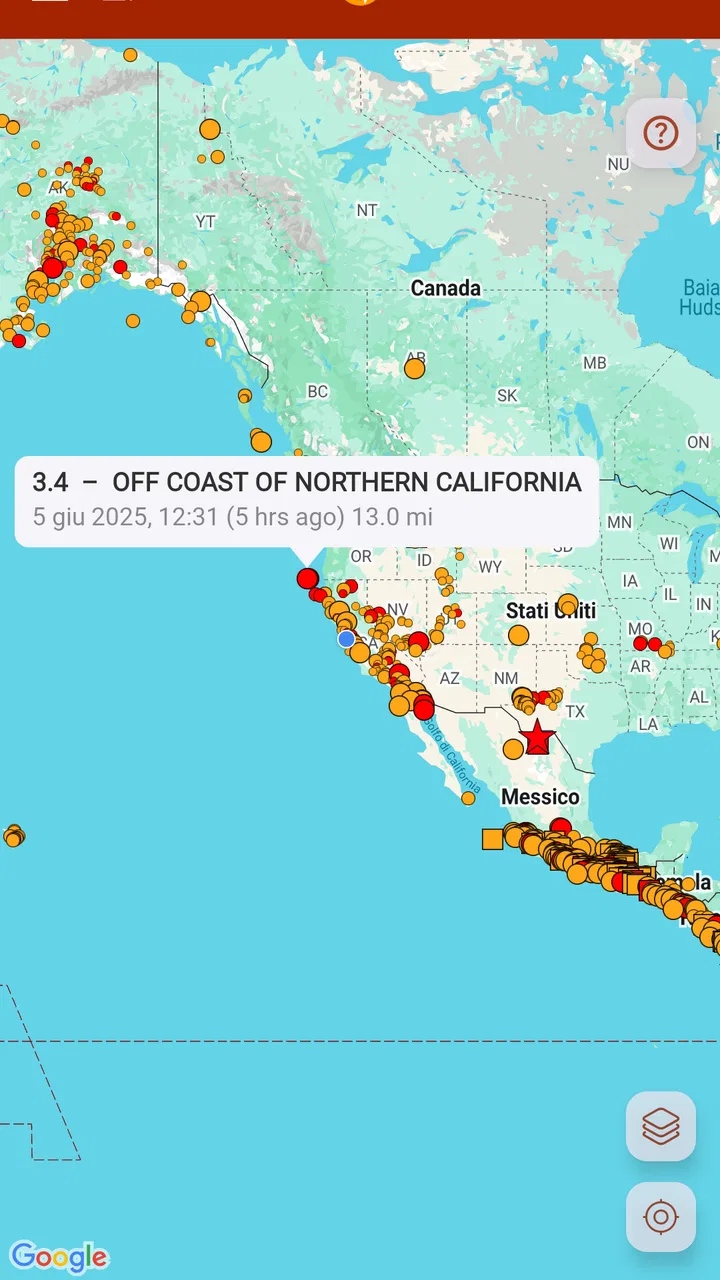
The store summary points to worldwide seismic data, push notification alerts, and a map. In practical terms, those three elements form a sensible workflow. You can open the app to inspect activity, use the map to understand where an event occurred, and rely on notifications when you want the app to bring a new event to your attention. I find that more useful than scrolling through an undifferentiated list, especially when several earthquakes appear in different parts of the world.
The app carries a 4.7 average from around 63 thousand ratings, which suggests that its focused design has connected with many users. I would not treat that score as proof that every alert or map view will suit everyone, but it does make Earthquake worth considering if your interest is specifically seismic activity. The developer is Nico Tranquilli, and the straightforward identity of the product is one of its strengths: there is little ambiguity about why you would open it.
A map is more useful than a headline alone
Earthquake information can be confusing when it is presented without location. A magnitude figure or a place name may mean very different things depending on distance, depth, and the surrounding geography. The map gives the event a visual setting, allowing me to distinguish something near an area I care about from an event on the other side of the planet.
That makes the app particularly useful for people with family abroad, travelers checking a destination, students following geology, and readers who want a quick visual reference while watching the news. It can also help after a felt tremor: rather than relying only on social media posts, you can check whether a corresponding event is appearing in the app and inspect its location.
There is a trade-off here. A map can create a false sense of precision if you do not understand what the displayed event represents. A marker shows where an earthquake was recorded, not the exact area of damage or the boundaries of its effects. I would use the map as an orientation tool, then turn to official emergency services for safety instructions or local impact information.
Notifications require deliberate handling
Push alerts are potentially the most useful part of Earthquake, but they are also the feature that deserves the most careful setup. A worldwide stream can become noisy if every event is treated as equally important. If the app offers visible choices for notification behavior, I would begin conservatively and adjust only after seeing how often alerts arrive and whether they match the regions or event types that matter to me.
This is an important trust issue. An alert should prompt you to check information, not trigger panic. I would avoid treating a notification as a direct instruction to evacuate, especially when traveling or when an event has occurred far away. The sensible workflow is to open the event, check its location and context, and then consult local authorities if you are actually in the affected area.
Another practical point is battery and attention. Any app that sends frequent notifications can become irritating if its controls are too broad for your needs. Earthquake is a better fit for someone willing to make a few careful notification choices than for someone who wants a completely silent background utility. If you only want to check seismic activity occasionally, leaving alerts disabled and opening the map manually may be the calmer approach.
Trust, controls, and everyday use
When I review an alert-based app, I pay attention not only to its visible features but also to how much control it gives me. Earthquake’s value depends on clear user choices: whether notifications are enabled, which events deserve attention, and whether I can inspect information without feeling pushed toward constant engagement. I would recommend reviewing the app’s notification settings immediately after installation rather than accepting every prompt automatically.
The free download lowers the barrier to trying it. In-app purchases are listed at $7.99 per item, so I would inspect each purchase screen carefully before confirming anything. A paid option can be reasonable if it removes a real annoyance or adds a control you genuinely need, but I would not pay simply because earthquake alerts feel urgent. Emergency information should never be evaluated through panic or pressure.
For data-sensitive users, the best habit is to read the permission prompts and privacy choices shown on the device, grant only what feels necessary, and revisit those choices later. I would not assume that an app needs access to unrelated parts of the phone merely because it displays a map or sends notifications. Notification access and location-related behavior can affect how comfortable you feel using the app, so the right decision is the one that matches your preferred balance between convenience and privacy.
That approach also makes the app easier to trust. I prefer applications where the user can see what is being enabled and can change it without having to surrender control of the whole phone. Since Earthquake is designed around seismic updates, I would keep its role narrow: allow the interaction needed for alerts if I want them, but avoid giving broader access unless the app clearly explains why it is needed and I am comfortable with that explanation.
A realistic situation where it helps
Imagine that I am staying with relatives in another country and receive messages saying that people felt shaking nearby. I would open Earthquake, look for the relevant event, and use the map to see whether the recorded location is close to the town where my relatives are staying. That gives me a useful starting point for a conversation, but it does not replace calling them, checking local authorities, or following evacuation instructions.
If I am planning a trip, I might use the app as one part of a broader preparation routine. I could check recent seismic activity around the destination, save the location of official emergency information, and learn the local guidance before traveling. The app is helpful in that routine because it makes seismic events visible, but it cannot tell me whether a hotel is safe, whether roads are open, or what local authorities recommend.
For a geology student, the map can make worldwide activity easier to follow than isolated news reports. Comparing locations over time may encourage better questions about tectonic regions and earthquake distribution. Still, I would treat the app as a convenient observation tool rather than an academic database unless the displayed information meets the requirements of a particular assignment.
Where it falls short
The biggest limitation is the narrow scope. If you want a single app for forecasts, radar, severe-weather warnings, air quality, and earthquakes, Earthquake will feel incomplete. A mainstream weather application may be a better everyday choice for most households, with a dedicated seismic app installed alongside it only if earthquakes are a specific concern.
It is also not the right tool for prediction. No map marker or notification should be interpreted as a forecast of what will happen next. Users who need official warnings, evacuation instructions, shelter information, or updates about infrastructure should rely on government agencies and local emergency services. Earthquake can help you notice and locate an event, but it is not a substitute for those sources.
Another possible friction point is alert relevance. Worldwide coverage sounds useful, yet global information is not automatically personal information. An event thousands of kilometers away may be interesting but irrelevant to your immediate safety. The app works best when you actively manage your attention and resist the temptation to turn every notification into a reason for concern.
I would also be cautious about interpreting the rating and install count too broadly. Around 63 thousand ratings and more than a million installs show substantial interest, while the 4.7 average is encouraging. They do not guarantee that the interface, notification behavior, or purchase options will fit your phone and habits. The most useful test is to install the free version, inspect its controls, and see whether its event presentation makes sense to you before considering any optional purchase.
Who should install it
Earthquake is a good match for people who follow seismic activity by choice rather than by accident. It suits travelers, families with relatives in earthquake-prone regions, educators, students, news-conscious users, and anyone who wants a dedicated map instead of a general weather dashboard. It is especially practical if you prefer checking one focused source rather than searching the web whenever an earthquake is mentioned.
I would skip it if you rarely care about earthquakes and already feel overloaded by phone notifications. I would also skip relying on it as your only safety resource. People living in an area with official emergency-alert systems should enable those systems first, because local authorities are the appropriate source for urgent instructions. This app can complement that preparation, not replace it.
Families may want to agree on a simple rule before enabling alerts: a notification means “check reliable information,” not “panic.” That small distinction prevents the app from becoming a source of unnecessary anxiety. It also helps children and less technical users understand what the map and alerts can realistically tell them.
My cautious verdict
After looking at Earthquake as both a seismic monitor and an alert-based utility, I see a focused app with a clear reason to exist. The worldwide event view, map, and push notifications fit together naturally, and the free entry point makes it easy to decide whether the presentation works for you. I appreciate that it does not need to pretend to be a complete weather platform to be useful.
My recommendation comes with one condition: use it as an awareness tool, not an authority. Check the map for context, tune notifications so they remain meaningful, review visible permissions and purchase choices, and turn to official local sources when safety decisions are involved. That combination gives you the benefit of quick seismic information without asking the app to do a job it was never designed to handle.
For me, the strongest reason to keep Earthquake installed would be the convenience of having worldwide seismic activity and a geographic view in one focused place. The weakest reason would be fear-driven monitoring. If you want a calm, adjustable way to follow earthquakes, it is worth trying. If you need broader weather coverage or official emergency instructions, pair it with a more comprehensive alternative instead of expecting this small specialist app to cover everything.
The age rating of Everyone also makes it approachable for a broad audience, but that does not remove the need for adult judgment around alerts and emergency information. Used thoughtfully, Earthquake earns its place as a companion for checking seismic events. It becomes much less suitable when notifications are treated as predictions, maps are mistaken for damage reports, or optional purchases are made without first deciding what extra value they provide.
FAQs for Earthquake
01What is the Earthquake app used for?
Earthquake is designed to help users monitor seismic activity and stay informed about earthquakes around the world. Depending on the version and platform, it may provide recent earthquake listings, magnitude information, locations, maps, alerts, and historical data. It is useful for awareness and quick access to earthquake information, but it should be treated as an informational tool rather than a replacement for official emergency services.
02Does Earthquake provide real-time earthquake alerts?
The app may offer notifications for newly detected earthquakes, but the speed and availability of alerts can depend on regional data sources, internet connectivity, device permissions, and the app’s notification settings. Users should enable notifications and location access when appropriate, then review the available alert preferences. For urgent warnings and evacuation instructions, always rely on official government agencies and local emergency authorities.
03Does Earthquake work without an internet connection?
Most earthquake information requires an active internet connection because the app receives updated data from online seismic monitoring services. Previously loaded information may remain visible temporarily, but new events, maps, and alerts generally cannot be guaranteed offline. If you are traveling or preparing for emergencies, keep official emergency numbers, local safety instructions, and other offline resources available instead of depending on the app alone.
04Is Earthquake accurate and reliable for emergency decisions?
Earthquake can be a convenient way to view seismic information, but displayed details may vary depending on the data providers, update intervals, and the time required to verify an event. Magnitude, depth, and location can sometimes be revised after the initial report. The app should support general awareness, not replace official warnings, emergency broadcasts, professional monitoring services, or instructions from local authorities during a dangerous situation.
05Is Earthquake free to download, and what permissions does it require?
Earthquake may be available as a free download, although some versions can include advertising, optional purchases, or premium features. Before installing, check the store listing for the current pricing and subscription details. The app may request permissions for notifications, location, and internet access, depending on its features. Review these permissions carefully and only grant access that seems necessary for alerts and map-based information.
Pros
- Provides timely earthquake alerts based on your location.
- Offers useful safety information for before
- during
- and after a quake.
- Simple interface makes essential features easy to find.
- Can help users monitor seismic activity in different regions.
- Useful for travelers and people living in earthquake-prone areas.
Cons
- Alert timing may vary depending on location and data availability.
- Some features may require an active internet connection.
- Frequent alerts can become distracting during periods of aftershocks.
- Coverage and accuracy may differ between countries or regions.
- Location access may raise privacy concerns for some users.

Earthquake
Gallery